




- Published on: 2026-10-10 06:53:17
How to Secure Your Mobile Trading App: A Practical 2026 Guide

A strong password can’t secure a trading account on its own. If you’re wondering how to secure your mobile trading app, focus on a set of connected safeguards, not one setting you switch on and forget. Phishing, account takeovers, and unauthorized trades are real concerns: a convincing message or an unlocked phone can give someone an opening.
This guide lays out a practical routine for protecting your account and device. You’ll learn which safeguards to prioritize, how to assess suspicious messages and sign-in prompts, and what to do if something looks wrong. No single measure eliminates every risk, but consistent habits can help you respond with more confidence.
We’ll cover unique passwords and multi-factor authentication, device passcodes and biometrics, software updates, app permissions, and safer connections. Then we’ll look at impersonation and investment scam warning signs, followed by practical first steps if you suspect someone has accessed your account. Set up the routine once, review it regularly, and trade with greater control over your account security.
Key Takeaways
- Learn how to secure your mobile trading app with a setup sequence covering installation, updates, authentication, device locks, and account monitoring.
- Check the app publisher and download source before signing in to reduce the risk of installing a fake trading app.
- Assess suspicious messages by their sender, links, urgency, and requested actions. Verify account notices through a channel you open independently.
- Follow a prioritized response plan if you suspect unauthorized access, including securing credentials and documenting unusual activity.
- Use a quick pre-trade check and recurring account review to keep your security habits consistent.
Why mobile trading app security starts with your device and account
Protecting a trading account means securing more than the app. Mobile trading app security includes your phone or tablet, its operating system, your login credentials, active sessions, personal information, and account recovery methods. Each layer affects the others. A strong password won’t help much if someone can unlock your unattended phone or access the email account used to recover your trading account.
Account access can be targeted through stolen devices, deceptive messages, reused passwords, or someone posing as a broker or support representative. Good security habits reduce opportunities for unauthorized access, but they don’t control market movements or prevent investment losses. Keep the risks distinct: account security protects access and information, while trading decisions still carry financial risk.
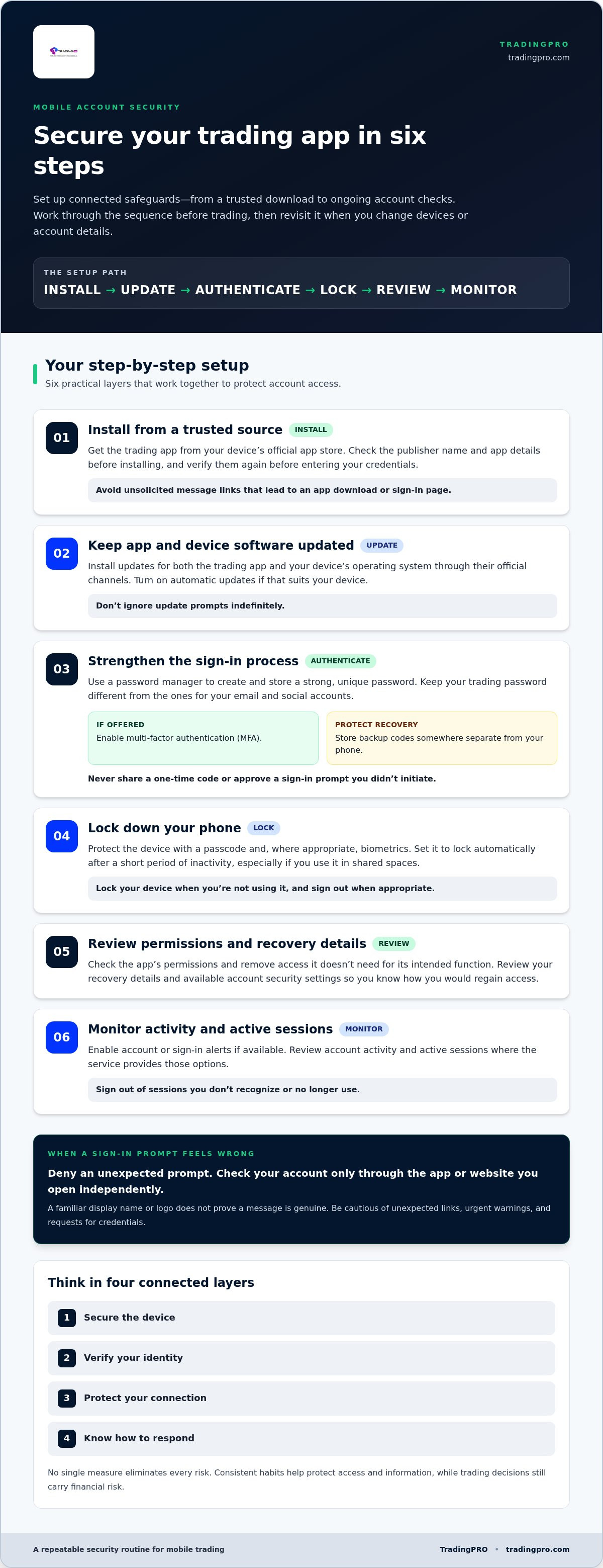
Think in four layers: secure the device, verify your identity, protect your connection, and know how to respond. This framework makes it easier to understand how to secure your mobile trading app without treating one setting as a complete solution.
What does mobile trading app security include?
Think of security as a chain linking the trading app, your operating system, account credentials, and recovery channels such as your email address or phone number. If one link is weak, it can undermine the rest. For example, an account may have a strong password but still be at risk if someone gains access to an unlocked device or a compromised recovery inbox.
Settings differ across apps and devices, so the available protections won’t always look the same. The broader principles of Mobile Security Overview explain why device, software, and information safeguards work together. Review the options on your phone and trading account rather than assuming every platform has identical controls.
Which threats should mobile traders recognize first?
Start with common ways someone might try to access your account. Scams often imitate familiar brands or exploit moments when a message pressures you to act quickly. Pause before replying, signing in, or sharing information.
- Impersonation and phishing: A text, email, or message may mimic a broker, support team, or account alert. A familiar display name or logo doesn’t prove the sender is genuine. Be cautious of unexpected links, urgent warnings, and requests for credentials.
- Reused passwords: If a password used elsewhere is exposed, someone may try it on other accounts. Use a distinct password for trading access, and never share verification codes. A code may be the final step an impostor needs to sign in.
- Lost or unattended devices: An unlocked phone or open trading session can expose account information to anyone who gets access. Lock your device when you’re not using it and sign out when appropriate.
- Suspicious downloads: Apps obtained from unofficial sources may not be what they claim. Check the download source and publisher before installing an app or entering your credentials.
Recognizing these risks gives you a practical starting point: secure each layer, question unexpected requests, and act promptly when account activity looks unusual.
How to secure a mobile trading app with a step-by-step setup
Make account protection part of your setup, not a last-minute fix. Work through these steps before trading, then revisit them when you change devices or account details. The sequence takes you from a trusted download to ongoing account checks.
- Install: Download the trading app from your device’s official app store. Check the publisher name and app details before installing, and verify them again before entering your credentials. Avoid links in unsolicited messages that lead to an app download or sign-in page.
- Update: Install updates for both the trading app and your device’s operating system through their official channels. Turn on automatic updates if that suits your device, and don’t ignore update prompts indefinitely.
- Authenticate: Create a strong, unique password with a password manager. Enable multi-factor authentication (MFA) if the service offers it, and store backup codes somewhere separate from your phone.
- Lock: Protect the phone with a passcode and, where appropriate, biometrics. Set it to lock automatically after a short period of inactivity, especially if you use it in shared spaces.
- Review: Check the app’s permissions and remove access it doesn’t need for its intended function. Review your recovery details and available account security settings so you know how you would regain access.
- Monitor: Enable account or sign-in alerts if available. Review account activity and active sessions where the service provides those options, and sign out of sessions you don’t recognize or no longer use.
Secure the app, password, and sign-in process
A password manager can generate and store a long, distinctive password so you don’t have to reuse an easier one. Use a different password for your trading account than for your email or social accounts. If MFA is offered, activate it and keep recovery codes offline or in another secure location. Never share a one-time code or approve a sign-in prompt you didn’t initiate. If an unexpected prompt appears, deny it and check your account through the app or website you access independently.
Updates address avoidable software gaps, while unique passwords limit the damage if credentials for another account are exposed. Neither step makes an account immune to attacks, but both strengthen your security routine.
Harden the phone and review app access
Keep your operating system and app current, installing updates only through your phone’s official settings or app store. Review app permissions after installation and periodically afterward. For example, question access that doesn’t appear necessary for the app’s function, and revoke it through your device settings if appropriate. Menu names vary between devices, so look in the operating system’s privacy or app-permission controls.
Good access habits are a practical foundation for responsible trading. If you’re ready to explore TradingPRO’s account options, you can register for a TradingPRO account after reviewing the security steps that help protect account access.
How to spot fake trading apps, phishing, and suspicious activity
A convincing logo, familiar brand name, or polished screen doesn’t prove a trading message or app is genuine. Scammers can imitate account alerts and support conversations, then use urgency to push you into revealing information or installing unsafe software. A practical part of how to secure your mobile trading app is to pause and check what’s behind an unexpected request before acting.
How can traders recognize a phishing message?
Assess an unexpected notice by looking at the sender, destination link, tone, and requested action. A message may claim there’s an urgent login problem, threaten account suspension, promise a prize, or ask you to confirm a password or verification code. Even a familiar display name can be faked. Don’t rely on the logo or sender label alone.
Instead of tapping a link in an unexpected message, open the trading app directly or type a website address you already know. If you need help, use contact details you find independently through the app or the provider’s official website. Don’t reply to the suspicious message or call a number it supplies.
- Inspect the destination: Check the full web address without opening it. Look for misspellings, extra words, or a domain that doesn’t match the provider’s known address. A shortened link can conceal where it leads.
- Reject pressure: Treat demands to act immediately, install an unfamiliar app, or move a conversation to another channel as warning signs.
- Protect sign-in approvals: Never share a one-time verification code, approve a prompt you didn’t initiate, or give a stranger remote access to your device. A caller claiming to be support may still be an impostor.
Fake app listings may also use copied branding and convincing descriptions. Use the official app store, inspect the publisher details, and be cautious of links sent by text, email, or social media. A professional design isn’t proof of authenticity.
What signs suggest an account or device may be compromised?
Look for changes you can’t explain. These may be clues, not definitive proof, so verify them through a trusted route before drawing conclusions. Check your account directly rather than following links in a notification.
- An unfamiliar login alert or sign-in prompt you didn’t trigger.
- Recovery details, security settings, or profile information that appear to have changed.
- Unexpected difficulty signing in, or access that stops working for no reason you recognize.
- Account activity or device behavior you can’t account for.
If something seems wrong, don’t engage with the message or caller that raised the alarm. Open the service through a trusted channel and investigate there. A single alert may have an innocent explanation, but unexplained changes deserve prompt attention. Note what you saw and when; that record can help you describe the issue clearly if you need to report it.
What to do if your mobile trading account may be compromised
An unfamiliar login, account change, or trade you didn’t make deserves prompt attention. Stay calm and follow a clear order: secure access, contact the provider through a trusted channel, then document what happened. Don’t follow links or phone numbers in a suspicious message, and don’t share passwords or verification codes with anyone who contacts you unexpectedly.
First actions after an unfamiliar login or trade
Use a different trusted device if you suspect your phone itself may be compromised. Access the trading service through its official app or by entering a website address yourself. Report the specific alert, trade, or account change through the provider’s established support channel, and follow its instructions for securing access. If you can still sign in safely, change any exposed password and review or end active sessions where those controls are available.
Keep a clear record while the details are fresh. Note when the alert arrived, what activity you noticed, and which changes you didn’t make. Save relevant messages or screenshots, but don’t include passwords, one-time codes, or other sensitive credentials in your notes or when reporting the issue.
How to restore access and reduce repeat risk
Once you’ve reached the service through a trusted route, work through the affected access points. If you can’t sign in, report that directly and use the provider’s account-recovery process rather than an unsolicited link.
- Change exposed credentials: From a trusted device, replace the compromised password with a unique one. Secure the email account used for recovery too, particularly if it shares a password or shows unusual activity.
- Review account access: Check recovery details, recent activity, and active sessions where available. Remove sessions or devices you don’t recognize, and update recovery information if it has been changed without your permission.
- Check for SIM takeover: If your phone unexpectedly loses mobile service, or you suspect someone has taken control of your number, contact your mobile carrier through its official channel. Ask it to investigate the number and help secure the account. A compromised number may put calls or text-based verification at risk.
- Address device concerns: If you suspect unsafe software, avoid signing in on that device until you’ve addressed the issue. Remove suspicious downloads and reinstall the trading app only from an official app store once the device is trusted.
These steps can help contain a suspected compromise, but they can’t guarantee account recovery or reimbursement. The provider’s procedures and any applicable protections may depend on the circumstances and jurisdiction. Keep your notes and follow up through verified channels. Knowing how to secure your mobile trading app includes having a response plan before an alert appears.
Responsible account habits are part of trading preparation. Before creating an account, review the available options and consider the risks involved.
Build a repeatable mobile trading security routine before you trade
Security works best as a steady habit, not a task you remember only after an alert. A short check before signing in, plus a more thorough review on a recurring schedule, helps you notice changes and keep account access under control. These habits protect access to your account and information. They can’t prevent market losses or guarantee trading outcomes.
A practical daily and monthly security checklist
Before each trading session, confirm you’re using the genuine app on a device you trust. Check for unusual alerts and pause if anything about your sign-in or account activity seems unfamiliar. Set a recurring calendar reminder for a deeper review so important details don’t fade into the background.
- Before signing in: Open the app from your device rather than following a message link. Confirm it came from the official store and use a private, trusted device.
- Before you trade: Review account notifications and look for activity you can’t explain. Investigate concerns through a channel you access independently, not through details supplied in an unexpected message.
- On your regular review: Check that your password remains unique, your recovery details are current, and available session controls show no access you don’t recognize. Remove old sessions or devices where the account provides that option.
- After a device or account change: Revisit your sign-in and recovery setup if you replace your phone, change your email address or number, or notice an unfamiliar prompt.
Keep the routine simple enough to repeat. A quick pause can help you spot a problem before proceeding, while a scheduled review gives you time to examine settings more carefully. Consistency is a practical part of how to secure your mobile trading app.
Choose a trading account with informed expectations
Security preparation is one part of responsible trading. Before registering, understand the account terms, consider the risks involved, and make sure you’re prepared for the possibility of losses. Learn the basics before live trading, and consider whether a beginner-focused option suits your experience and goals. Review the Rookie Account details as part of your decision.
Keep expectations clear: careful security practices help protect account access, but they don’t make a trading strategy profitable or remove market risk. Use what you’ve learned to prepare deliberately, then make decisions based on your knowledge and risk tolerance. Strong habits support a more controlled start, not a guaranteed result.
Take time to review your options and prepare before opening an account.
Make security part of your trading discipline
The strongest next step is consistency. Treat account protection as part of your broader preparation, and revisit your habits as your devices, contact details, and trading activity change. Knowing how to secure your mobile trading app gives you more control over account access, while sound decisions and an understanding of market risk remain essential to your trading plan.
TradingPRO offers Rookie, Micro, Pro, and Scalp account tiers, alongside social and copy trading. Take time to consider your experience, goals, and the risks before choosing how to trade. Build your routine with care, then move forward at a pace that suits you.
Ready to take your next step? Create your TradingPRO account and approach your trading journey with preparation and purpose.
Frequently Asked Questions
Is it safe to use a mobile trading app?
It can be reasonable to use a mobile trading app if you download the genuine app, protect your device, and use the account’s available safeguards. No app or security routine removes every risk. Before placing a trade, check that you’re signed in to the correct account and understand the order details shown on screen. Account security protects access, but it can’t prevent market losses or make trading decisions risk-free.
How can I tell if a trading app is legitimate?
Confirm the app is offered through an official app store, then compare its publisher information with the broker’s website, accessed independently. Check that the app name and developer match, and be wary of near-identical spellings or listings promoted through unsolicited messages. Store ratings and polished graphics aren’t proof on their own. If anything doesn’t line up, don’t sign in; find the provider’s official app listing through its known website.
Should I use public Wi-Fi to access a trading app?
Avoid signing in over public Wi-Fi if you can use a trusted private connection or mobile data instead. You may not know who controls a public hotspot or whether its network settings are trustworthy. If you must connect, avoid financial activity and account changes until you’re on a connection you trust. Don’t install a certificate, profile, or network tool suggested by a pop-up just to gain access.
What should I do if I receive a login code I did not request?
Don’t share the code or approve a sign-in prompt. An unexpected code could mean someone entered your details, but it doesn’t prove they accessed the account. Open the trading service independently, review available sign-in activity, and change your password if you suspect it’s exposed. If more codes arrive or you notice account changes, report them through the provider’s trusted support channel. Never reply to a message asking you to forward the code.
Can someone access my trading account if they steal my phone?
Possibly. The risk depends on whether the phone is locked, whether the trading app session remains active, and whether the thief can access related accounts or saved credentials. Use your device’s remote lock or erase option if it was enabled, and contact your mobile carrier if your number or service is affected. From another trusted device, secure your email and trading access, then report the lost phone to the provider.
Does multi-factor authentication guarantee my trading account is secure?
No. Multi-factor authentication adds a layer by requiring another proof of identity, but it can’t block every scam, compromised device, or account-recovery attack. Protect codes and approval prompts as carefully as your password. To secure your mobile trading app, combine MFA with a unique password, a locked device, and careful review of unexpected sign-in requests. Treat any approval you didn’t initiate as a warning.
What happens if I accidentally click a suspicious trading link?
If you only opened the link, close the page and don’t enter information, download files, or approve prompts. If you entered a password or code, use a trusted device to change exposed credentials and check the affected account for unfamiliar activity. If you installed something, remove the suspicious app or file and use your device’s security tools to assess it. Report the incident through independently verified support details, especially if account access has changed.


